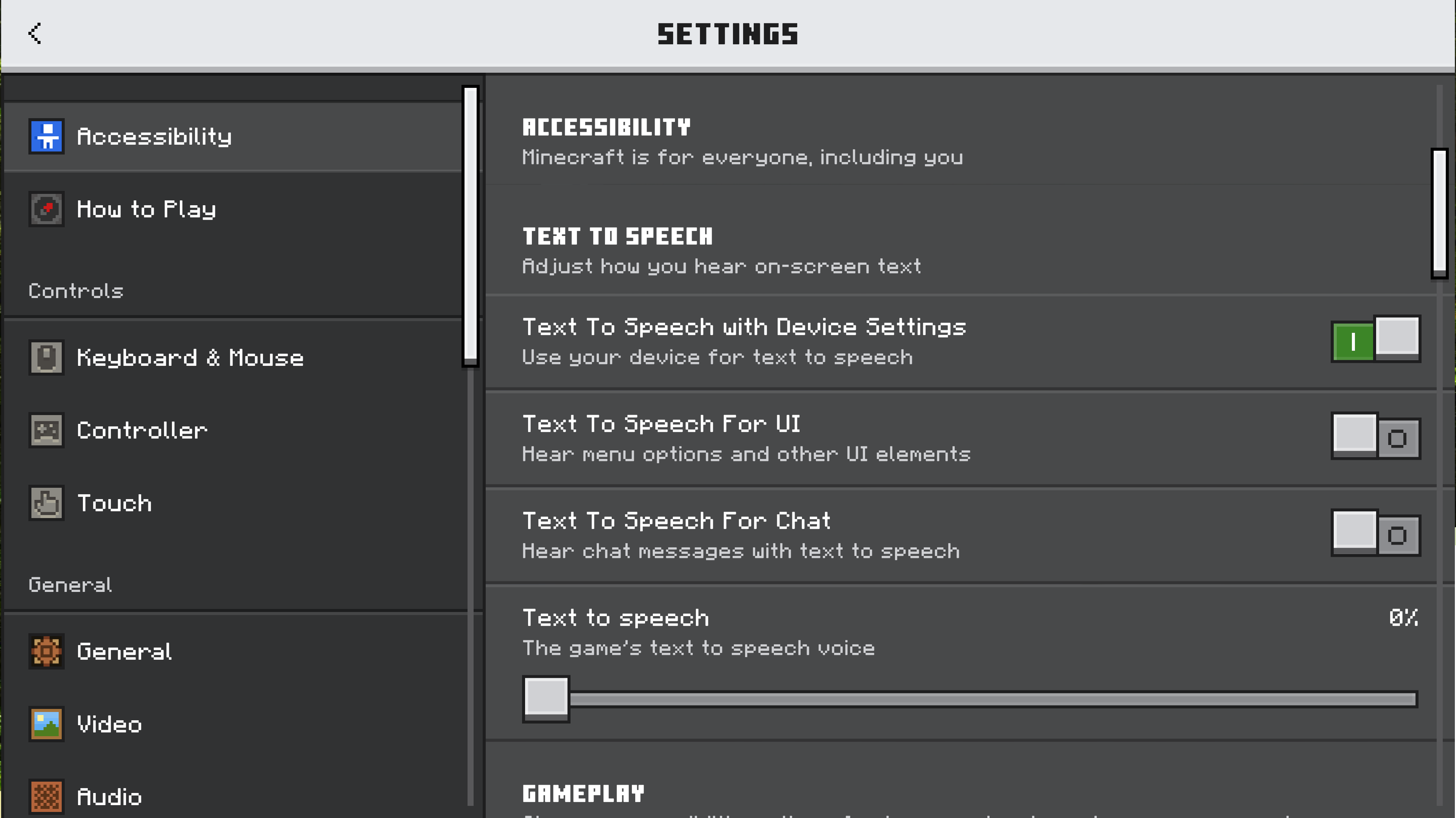
We welcome feedback about menus, toggles on menus, buttons on menus, input devices (like touch controls and keyboards), and Minecraft’s interface. How do you play? What would make it better?

1405

Let’s talk about our updated settings! (Bedrock)

Pinned

952 Comments

Please sign in to leave a comment.

Sorted by oldest
  • 1
    Registered User commented
    Comment actions Permalink

    Good and fresh but it is laggy on some devices

  • 0
    Registered User commented
    Comment actions Permalink

    Minecraft is a good game

  • 0
    Registered User commented
    Comment actions Permalink

    Os sons do jogo são muito baixos, mesmo no máximo. O único q fica alto o suficiente é o da música=/

  • 1
    Registered User commented
    Comment actions Permalink

    Add right click button

  • 0
    Registered User commented
    Comment actions Permalink

    Add right click button in pocket edition

  • 0
    Registered User commented
    Comment actions Permalink

    Hi

  • 0
    Registered User commented
    Comment actions Permalink

    Adorei o novo designer das configurações espero muitas mais coisas novas,nota 10/10 mojang.

  • 2
    Registered User commented
    Comment actions Permalink

    Hi Devs, could you please bring back the option to return to the old menu system? I'm having a lot of issues with the new "Ore UI," such as excessive lag, the slow loading of each options screens, and poor support for adjusting to different screen sizes, like in my case using Samsung panels (Edge). I'm not asking you to fix anything, just to return what was already working correctly.

  • 3
    Registered User commented
    Comment actions Permalink

    Horrible, actually. Specially this gigantic padding that we CANNOT remove. Even custom UI textures don't work anymore. It just gets worse and worse.

  • 0
    Registered User commented
    Comment actions Permalink

    Setting the music in the game to the lobby or to the game, for example Aria Math C418. When we click on the lobby and music, it plays, when we click on random, random music plays. There are many music lovers, this add-on would be nice.

  • 0
    Registered User commented
    Comment actions Permalink

    ดี

  • 2
    Registered User commented
    Comment actions Permalink

    I DONT WANT IT. KEEP IT THE WAY IT IS I HATE MOHJANG

  • 0
    Registered User commented
    Comment actions Permalink

    So Good, i Will be waiting for MAIN SCREEN

  • 0
    Registered User commented
    Comment actions Permalink

    ผมเข้าเล่นกับเพื่อนไม่ได้คับ

  • 0
    Registered User commented
    Comment actions Permalink

    My speech problem bug ai speech pls can fix bug mojang😕

  • 1
    Registered User commented
    Comment actions Permalink

    Damn, I can't get out, if I press general I can't go back to the dog, so please use the old look, please Mojang Studios

  • 0
    Registered User commented
    Comment actions Permalink

    I REAL love How you made all those commands and You guys Are Really work so hard for that I like How you Fixing everything thanks for everyone 🩵

  • 0
    Registered User commented
    Comment actions Permalink

    Moesis

  • 0
    Registered User commented
    Comment actions Permalink

    Version: v1.21.130.24
    Build: 38415722
    Branch: preview/hotfix_21U13-3
    SHA: 3a7f289d1529e455a71c58b67ad1f424310c6fa7
    Protocol Version: 888

  • 1
    Registered User commented
    Comment actions Permalink

    As more sections move to the new UI, the need for a sidebar becomes clearer. It’s inconvenient to jump between screens, and information feels too stretched out even on my 16:9 monitor, not to mention 21:9 ones.

    The redesigned Video Settings are organized much better than before, but there’s still room for improvement. For example, why is “In-game graphics mode switching” at the top (or why does it even need to exist), while it’s used only once and the much more frequently used “Field of View” slider is buried at the bottom.

    Options like “Render Clouds,” “Fancy Leaves,” and “Fancy Bubbles” would fit better under dropdown for each graphics mode, with values stored separately. That way players could enable both “Fancy Leaves” and “Fancy Bubbles” for Vibrant Visuals, keep only “Fancy Leaves” for Fancy Graphics, disable both for Simple Graphics, and switch between them with a click.

    Finally, the current Touch Controls settings screen feels cluttered, offering only three barely customizable presets. Joystick/D-Pad, Crosshair/Touch-to-interact, and button layout should be set separately, allowing players to mix what works best for them, for example, using “Interact” and “Attack” buttons with Joystick+Tap-to-interact, or the Joystick+Crosshair without any buttons, or combine buttons with the D-Pad. It’s also inconsistent that Crosshair/Touch-to-interact are fixed when using the joystick but toggleable, and from a completely different place, when using the D-Pad.

  • 0
    Registered User commented
    Comment actions Permalink

    Where's the frame smoother button

  • 0
    Registered User commented
    Comment actions Permalink

    Mojang where the frame smoother button pls Mojang pls

  • 0
    Registered User commented
    Comment actions Permalink

    It looks amazing, and I love the descriptions, but I wish there were options to make the UI smaller than %75

  • 0
    Registered User commented
    Comment actions Permalink

    Y

  • 0
    Registered User commented
    Comment actions Permalink

    Hi

  • 2
    Registered User commented
    Comment actions Permalink

    I like the colors, like "look at this new Minecraft UI color, wow👏👏". But I think there's one thing that makes this UI bad, namely the transitions. On older phones, transitions like this can be problematic. Because in some countries, many people still use potato phones. So I hope the developers can consider reducing the transition. But I think instead of making a UI like this, it's better to make a little touch of the old one, where the selection panel (on the left) is reduced, maybe like 25% and the remaining 75% is for the new UI.

  • 0
    Registered User commented
    Comment actions Permalink

    It's a great look but the on PC, how it's shown right now, I find myself snapping my head from one side of the screen to the other. I want to assume you will be adding back the side menu, resolving this issue.

  • 0
    Registered User commented
    Comment actions Permalink

    Biandg kosingf kiany

  • 1
    Registered User commented
    Comment actions Permalink

    It's very nice but the animations are running very slow, it's not related to my device, it's like this for everyone, please either increase the animation speed or try to optimize it.

  • 1
    Registered User commented
    Comment actions Permalink

    Add a way to enable/disable vsync