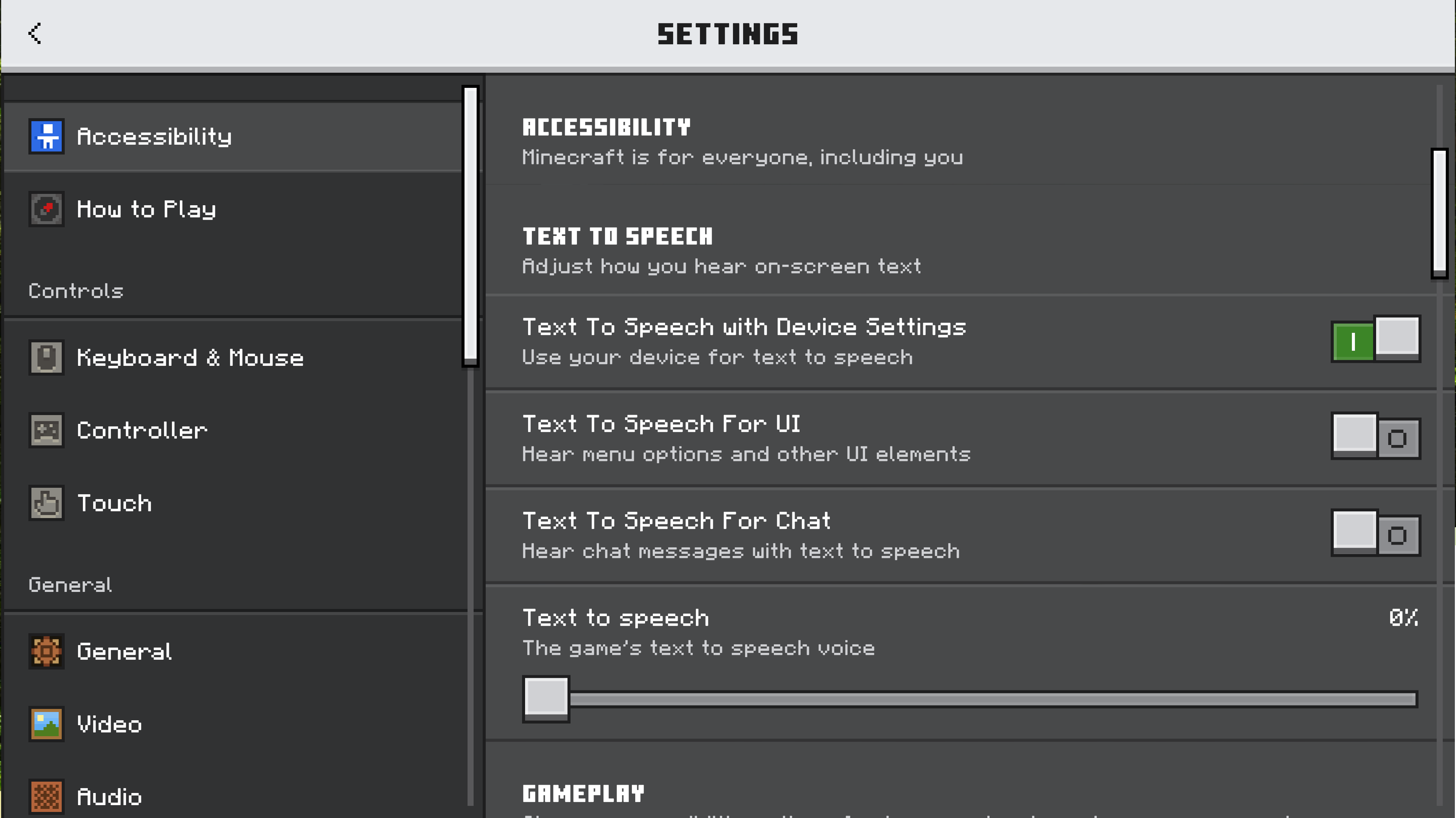
We welcome feedback about menus, toggles on menus, buttons on menus, input devices (like touch controls and keyboards), and Minecraft’s interface. How do you play? What would make it better?

1405

Let’s talk about our updated settings! (Bedrock)

Pinned

952 Comments

Please sign in to leave a comment.

Sorted by oldest
  • 0
    Registered User commented
    Comment actions Permalink

    جراند

  • 0
    Registered User commented
    Comment actions Permalink

    版本:v26.0.28
    版本:40209369
    Branch: r/26_u0
    SHA: 271a36b7a900bf315410d0aa282983d68d70baec
    协议版本:924

  • 0
    Registered User commented
    Comment actions Permalink

    很好

  • 4
    Registered User commented
    Comment actions Permalink

    It's cool but, I can't see my minecraft version in phone. Make that auto adjust screen size and there is 2nd problem too the second problem is the size of settings smaller and when we on large mode then that become too large fix all the problem please 🙏.

  • 0
    Registered User commented
    Comment actions Permalink

    Nice, I can't wait to see the other settings updated with Ore UI.

  • 0
    Registered User commented
    Comment actions Permalink

    I really like the new Ore UI Settings menu. It looks extremly clean and nice


  • 0
    Registered User commented
    Comment actions Permalink

    Ander

  • 5
    Registered User commented
    Comment actions Permalink

    Currently, the in-game World settings only have Game and Multiplayer tabs, which is basically the same layout as in older versions of the Create New World screen. Since in the modern Create New World screen the Game tab was split into General, Advanced, and Cheats, which was INCREDIBLY convenient, it would be better if the in-game World settings followed the same structure instead of merging everything back into a single tab.

    Example:

    WORLD

    • General (previously Game)
    • Advanced (previously Game)
    • Multiplayer
    • Cheats (previously Game)
    • Resource Packs
    • Behavior Packs
    • Experiments

    If some sections, such as Experiments or Language, can’t be changed in-game, they still shouldn’t be hidden. A simple message like:

    “This setting can only be changed from the Edit World / Main Settings screen”

    would be enough.


    Sometimes it’s important to see which Resource Packs and Behavior Packs are enabled, even if you can’t change them in-game — you can view them, but not modify. Because of that, it’s unclear why Language and Experiments are treated differently and hidden instead of being shown in a read-only state.

     
  • 0
    Registered User commented
    Comment actions Permalink

    Eu gostei desse novo design,mas pra quem é acostumado com o antigo é meio difícil de usar.

  • 1
    Registered User commented
    Comment actions Permalink

    I didn't like it, I prefer the old one

  • 0
    Registered User commented
    Comment actions Permalink

    algumas opções de mundo não estão disponiveis, e apos abrir qualquer menu a tecla espaço para de responder ate que eu feche e abra o jogo

  • 0
    Registered User commented
    Comment actions Permalink

    It's really good

  • 0
    Registered User commented
    Comment actions Permalink

    Edition

  • 1
    Registered User commented
    Comment actions Permalink

    The old one is much better

  • 1
    Registered User commented
    Comment actions Permalink

    Please let me leave beta it won't work

  • 0
    Registered User commented
    Comment actions Permalink

    Vibrant visuals seems to be not in many optimal devices fix that

  • 2
    Registered User commented
    Comment actions Permalink

    Make bedrock version resources pack to load and change in the world it's annoying to save and load again

  • 2
    Registered User commented
    Comment actions Permalink

    Why don't we focus on bringing back the ability to import and export from the application mode or from the application mode to external storage instead of forcing people to pay for your realms just so they are able to move their worlds around, absolutely pathetic that you continue to milk people out of their funds for features that used to be a part of the app.

  • 1
    Registered User commented
    Comment actions Permalink

    I want to play multiplayer

  • 1
    Registered User commented
    Comment actions Permalink

    ich hätte gerne wieder die farbenfrohe graphic einstellung zurück sie funktioniert hier nicht mehr in der neuesten preview auserdem habe ich problemme beim laden meiner recourcepacks

  • 1
    Registered User commented
    Comment actions Permalink

    I would like it if we could off hand troch pls


  • 0
    Registered User commented
    Comment actions Permalink

    I love how clean the new interface is, the best they could do the previous one already disgusted me

  • 0
    Registered User commented
    Comment actions Permalink

    Amazing

  • 0
    Registered User commented
    Comment actions Permalink

    Good

  • 0
    Registered User commented
    Comment actions Permalink

    I would like it to be easier to opt in and out of the beta from the settings menu. Also, there should be more recipes for string for peaceful mode. I'd also like a non-hostile survival mode for players with limited ram or don't want to have to deal with combat but like tracking their needs...

  • 0
    Registered User commented
    Comment actions Permalink

    Hot take: I think the Language icon needs changing, could be changed to a globe.

  • 2
    Registered User commented
    Comment actions Permalink

    Stevan MC

  • 2
    Registered User commented
    Comment actions Permalink

    Ocu da napravim onlajn server od već postojeceg servera

  • 2
    Registered User commented
    Comment actions Permalink

    🐥 I don’t know what to do

  • 1
    Registered User commented
    Comment actions Permalink

    I don't join the minecraft beta, but my game changed minecraft beta. So I was deleted beta, but I can't play normal version